> ## Documentation Index
> Fetch the complete documentation index at: https://docs.cognee.ai/llms.txt
> Use this file to discover all available pages before exploring further.
# Data Flows
> Follow the three data pipelines that move memory through Cognee.
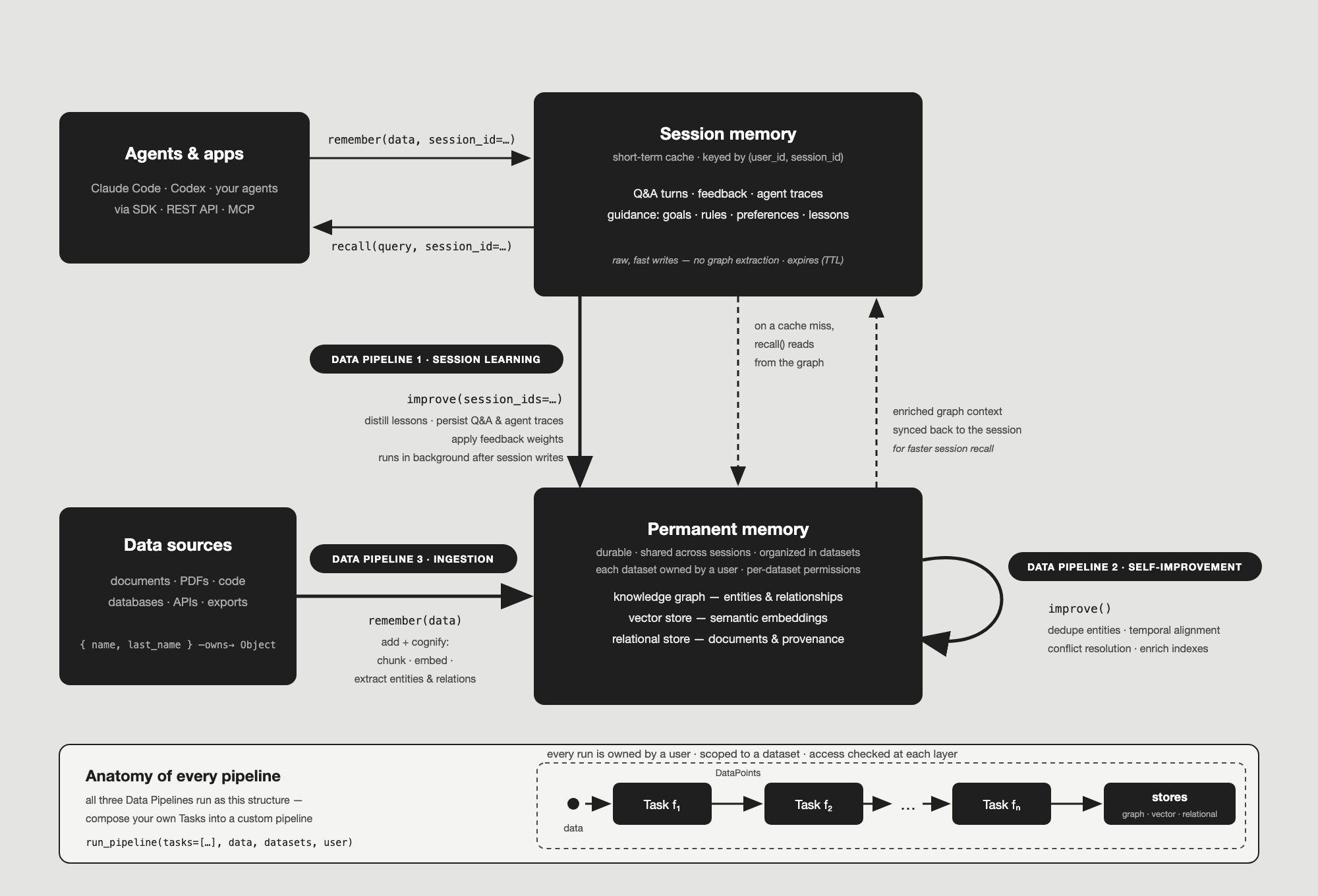
The [Architecture](/core-concepts/architecture) page explains where memory lives. This page explains how memory **moves**: three separate Cognee pipelines carry data between your agents, short-term session memory, and the permanent knowledge graph — and all three are built from the same Task-based structure you can use for your own pipelines.
 ## Data Pipeline 1 — Session learning
Agents write conversation turns, feedback, traces, and guidance into [session memory](/core-concepts/sessions-and-caching) with `remember(data, session_id=...)`. These writes are raw and fast — no chunking, no graph extraction — which is exactly why they don't reach the permanent graph on their own.
The session-learning pipeline is what bridges them. [`improve(session_ids=[...])`](/core-concepts/main-operations/improve) distills gated session guidance into curated lesson documents, persists session Q\&A and agent traces into the graph, and applies feedback weights so graph elements that helped produce well-rated answers become more influential in later retrieval. With `self_improvement=True` (the default for session writes), this pipeline starts automatically in the background; with `self_improvement=False`, session content stays in the cache until you run `improve()` yourself.
## Data Pipeline 2 — Self-improvement
Once data is in the permanent graph, the self-improvement pipeline enriches it in place. Running [`improve()`](/core-concepts/main-operations/improve) on a dataset adds derived retrieval structures on top of the existing graph — for example triplet indexes, and optionally dataset-level bucket and root summaries via the [global context index](/core-concepts/further-concepts/global-context-index) — so later recall works better without re-ingesting anything.
This pipeline is also how permanent memory feeds back into session learning: after enrichment, new graph relationships can be synced back into the session cache as readable context, making future session recall faster and better grounded.
## Data Pipeline 3 — Ingestion
Calling [`remember(data)`](/core-concepts/main-operations/remember) without a `session_id` writes straight to permanent memory. Under the hood this runs the [Add](/core-concepts/main-operations/legacy-operations/add) + [Cognify](/core-concepts/main-operations/legacy-operations/cognify) pipeline: documents are loaded and chunked, entities and relationships are extracted into the knowledge graph, embeddings are indexed in the vector store, and provenance is tracked in the relational store.
## How the two memories meet at read time
Retrieval ties the flows together. [`recall(query, session_id=...)`](/core-concepts/main-operations/recall) checks the session cache first; on a cache miss it falls through to the permanent knowledge graph, and results are tagged with the `_source` they came from. Combined with the sync-back from Data Pipeline 2, the session and the graph continuously exchange context in both directions.
## Anatomy of every pipeline
All three flows above — and any pipeline you build yourself — share one structure: a [Pipeline](/core-concepts/building-blocks/pipelines) is an ordered sequence of [Tasks](/core-concepts/building-blocks/tasks), where each Task transforms data and passes [DataPoints](/core-concepts/building-blocks/datapoints) to the next until results land in the stores.
Every run is **owned**: it executes on behalf of a user against a dataset, and user access to datasets and files is verified at each layer. That means the built-in pipelines and your custom ones follow the same rules — swap in your own Tasks, give the pipeline a unique name, and it runs with the same ownership, status tracking, and per-dataset serialization as the defaults.
How pipeline runs, caching, and per-dataset locking work
The operation behind session learning and self-improvement
How short-term session memory works and expires
## Data Pipeline 1 — Session learning
Agents write conversation turns, feedback, traces, and guidance into [session memory](/core-concepts/sessions-and-caching) with `remember(data, session_id=...)`. These writes are raw and fast — no chunking, no graph extraction — which is exactly why they don't reach the permanent graph on their own.
The session-learning pipeline is what bridges them. [`improve(session_ids=[...])`](/core-concepts/main-operations/improve) distills gated session guidance into curated lesson documents, persists session Q\&A and agent traces into the graph, and applies feedback weights so graph elements that helped produce well-rated answers become more influential in later retrieval. With `self_improvement=True` (the default for session writes), this pipeline starts automatically in the background; with `self_improvement=False`, session content stays in the cache until you run `improve()` yourself.
## Data Pipeline 2 — Self-improvement
Once data is in the permanent graph, the self-improvement pipeline enriches it in place. Running [`improve()`](/core-concepts/main-operations/improve) on a dataset adds derived retrieval structures on top of the existing graph — for example triplet indexes, and optionally dataset-level bucket and root summaries via the [global context index](/core-concepts/further-concepts/global-context-index) — so later recall works better without re-ingesting anything.
This pipeline is also how permanent memory feeds back into session learning: after enrichment, new graph relationships can be synced back into the session cache as readable context, making future session recall faster and better grounded.
## Data Pipeline 3 — Ingestion
Calling [`remember(data)`](/core-concepts/main-operations/remember) without a `session_id` writes straight to permanent memory. Under the hood this runs the [Add](/core-concepts/main-operations/legacy-operations/add) + [Cognify](/core-concepts/main-operations/legacy-operations/cognify) pipeline: documents are loaded and chunked, entities and relationships are extracted into the knowledge graph, embeddings are indexed in the vector store, and provenance is tracked in the relational store.
## How the two memories meet at read time
Retrieval ties the flows together. [`recall(query, session_id=...)`](/core-concepts/main-operations/recall) checks the session cache first; on a cache miss it falls through to the permanent knowledge graph, and results are tagged with the `_source` they came from. Combined with the sync-back from Data Pipeline 2, the session and the graph continuously exchange context in both directions.
## Anatomy of every pipeline
All three flows above — and any pipeline you build yourself — share one structure: a [Pipeline](/core-concepts/building-blocks/pipelines) is an ordered sequence of [Tasks](/core-concepts/building-blocks/tasks), where each Task transforms data and passes [DataPoints](/core-concepts/building-blocks/datapoints) to the next until results land in the stores.
Every run is **owned**: it executes on behalf of a user against a dataset, and user access to datasets and files is verified at each layer. That means the built-in pipelines and your custom ones follow the same rules — swap in your own Tasks, give the pipeline a unique name, and it runs with the same ownership, status tracking, and per-dataset serialization as the defaults.
How pipeline runs, caching, and per-dataset locking work
The operation behind session learning and self-improvement
How short-term session memory works and expires