> ## Documentation Index
> Fetch the complete documentation index at: https://docs.cognee.ai/llms.txt
> Use this file to discover all available pages before exploring further.
# Watch Feedback Reshape the Graph
> Run a local chat app where every answer can be rated and a memify pass turns those ratings into feedback weights you can see move on the graph
Your users rate the answers your assistant gives, and you want to know what that rating actually did to the memory behind it — not in aggregate, weeks later, but on the next screen refresh.
## What You'll Build
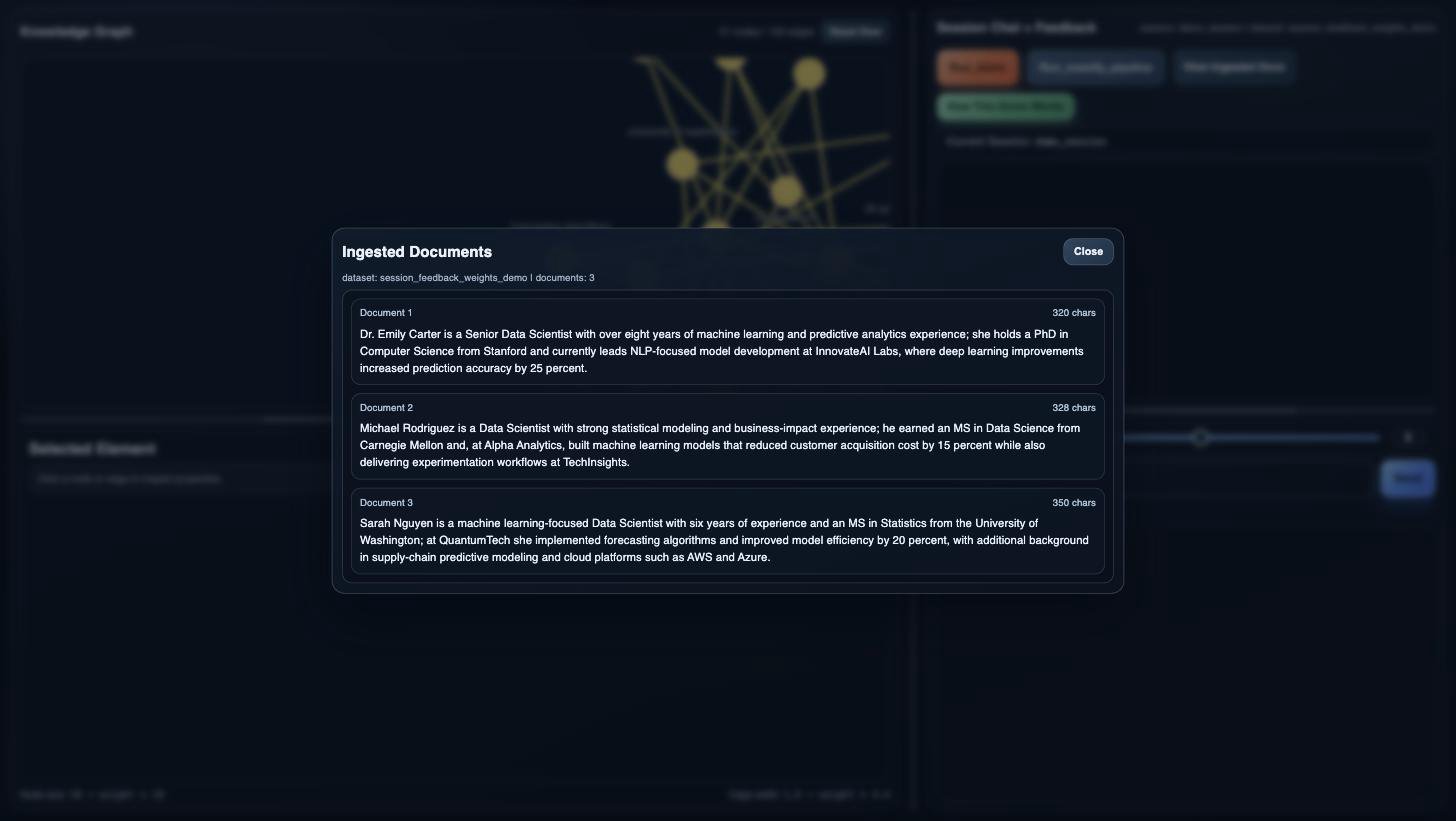
A small FastAPI service plus a browser UI, running side by side on your machine. Three short candidate profiles are remembered into an isolated dataset, and the knowledge graph built from them is drawn in the left panel with node size and edge thickness scaled by each element's `feedback_weight`. In the right panel you ask questions in one session, rate the answers 1–5, and then run the feedback memify pipeline — which reads the session's rated Q\&A entries, updates the `feedback_weight` of the graph nodes and edges those answers used, and hands back a before/after snapshot with a per-element delta. The graph redraws from the "after" side, so a rating you gave a moment ago is visible as a node that grew or shrank.
The complete runnable demo is
[`examples/demos/sessions/session_feedback_lifecycle_demo/`](https://github.com/topoteretes/cognee/tree/main/examples/demos/sessions/session_feedback_lifecycle_demo) —
this page walks through the key moments of its backend rather than reproducing it.
## Features in Play
* [Remember](/core-concepts/main-operations/remember) — loads the bundled candidate profiles into the demo dataset in one call
* [Recall](/core-concepts/main-operations/recall) — answers every question with `GRAPH_COMPLETION` against that dataset, inside the demo session
* [Sessions](/guides/sessions) — the shared `session_id` that makes every question, answer, and rating part of one conversation
* [Feedback System](/guides/feedback-system) — `cognee.session.add_feedback` attaches a 1–5 score and a comment to a specific `qa_id`
* [Session-Context Guidance](/core-concepts/sessions-and-caching#session-context-guidance-auto-feedback) — with `AUTO_FEEDBACK` on, a rating typed as an ordinary chat message can land on the previous answer without an explicit API call
* [Improve](/core-concepts/main-operations/improve#with-session-ids) — the feedback-weight pass, which this demo triggers directly as a memify pipeline so it can snapshot the graph on either side of it
## How It Looks
The interface in these screenshots is not the [Cognee UI](/cognee-cloud/local-ui) — it is a small frontend bundled with this demo (`frontend/` in the demo folder), built only to make the feedback loop visible. Beyond the logo, it shares nothing with the Cognee UI.
The frontend is plain HTML, CSS, and JavaScript with D3 for the graph; there is no build step, and the backend serves it directly. On first load the app initializes itself behind a loading overlay — isolated storage, ingestion, the first graph build — and then opens a walkthrough panel with the intended order: inspect the ingested documents, ask a question, praise the answer, ask another, criticize it, run the scripted replay, and look at what changed. Clicking a step highlights the part of the UI it refers to, and the `How This Demo Works` button reopens the panel any time.
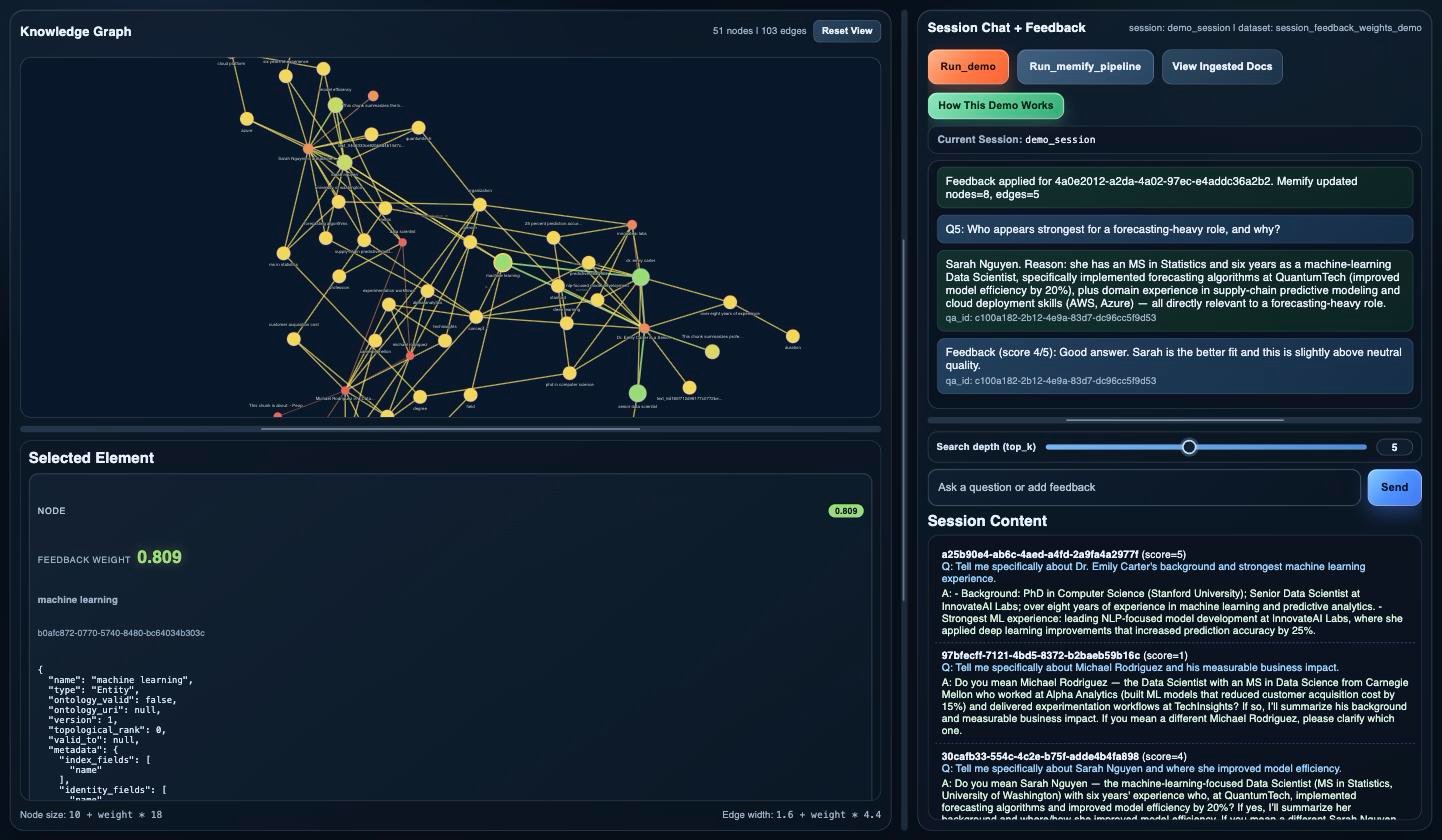
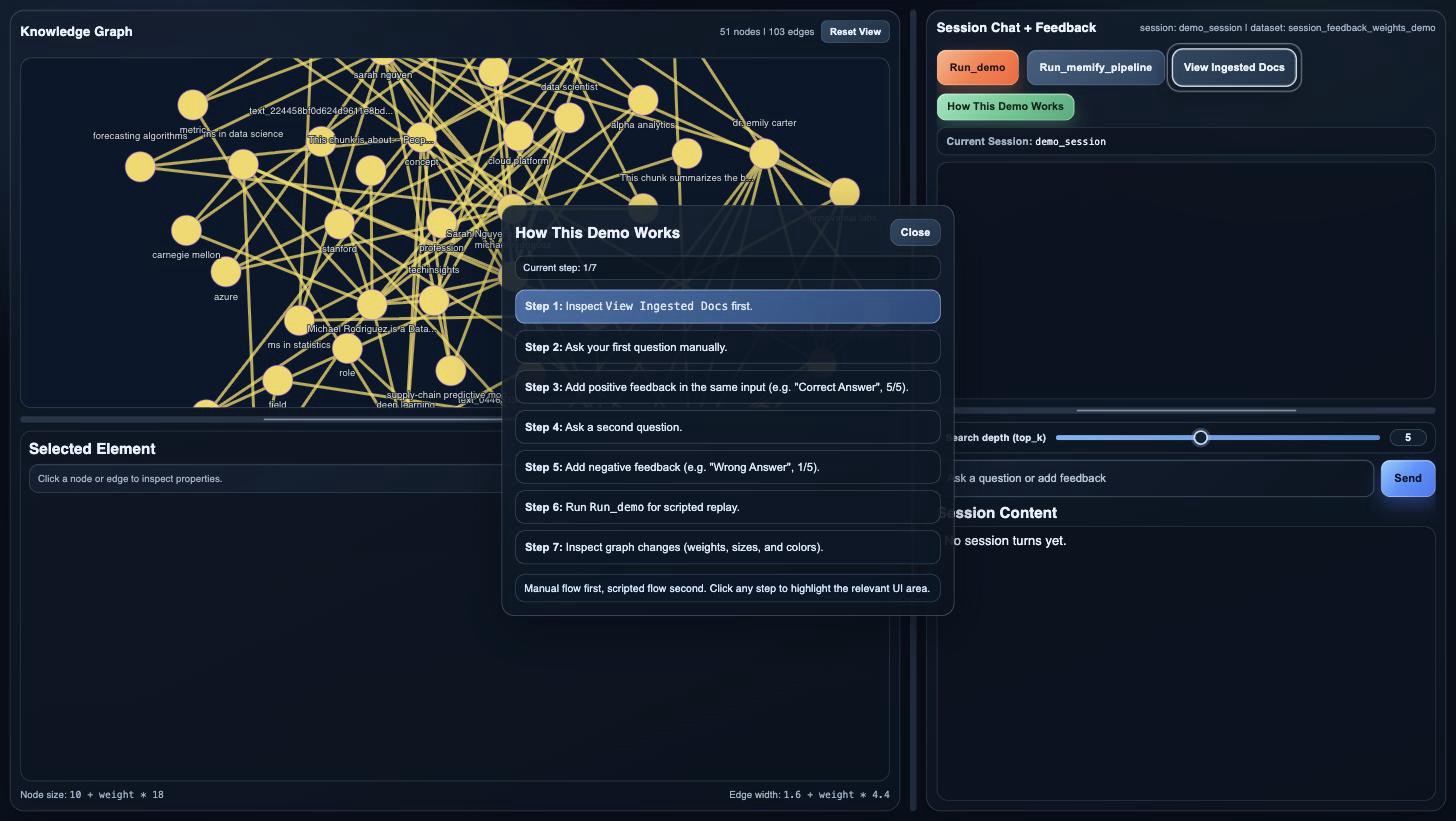 The left panel is the graph. The header counts nodes and edges and `Reset View` re-centers the layout; the legend at the bottom states the scaling formulas — node size is `10 + weight * 18`, edge width `1.6 + weight * 4.4`, and color follows the same signal — which is why an untouched graph draws uniform and a memify run is a visible change rather than a number: praised regions grow and turn green, criticized ones shrink toward red. Clicking any node or edge fills the `Selected Element` panel below with its properties, `feedback_weight` included.
The right panel is the session. Across the top sit the four controls: `Run_demo` (the scripted replay), `Run_memify_pipeline` (fold the session's ratings into the graph and redraw), `View Ingested Docs`, and `How This Demo Works`. Below them, the current `session_id` badge, the chat itself, the `Search depth (top_k)` slider that sets `top_k` for the next question, and a single input that takes both questions and feedback — type "Wrong answer, 1/5" as an ordinary message and `AUTO_FEEDBACK` attaches it to the previous answer. `Session Content` at the bottom lists the session's Q\&A entries with the scores they have accumulated.
The left panel is the graph. The header counts nodes and edges and `Reset View` re-centers the layout; the legend at the bottom states the scaling formulas — node size is `10 + weight * 18`, edge width `1.6 + weight * 4.4`, and color follows the same signal — which is why an untouched graph draws uniform and a memify run is a visible change rather than a number: praised regions grow and turn green, criticized ones shrink toward red. Clicking any node or edge fills the `Selected Element` panel below with its properties, `feedback_weight` included.
The right panel is the session. Across the top sit the four controls: `Run_demo` (the scripted replay), `Run_memify_pipeline` (fold the session's ratings into the graph and redraw), `View Ingested Docs`, and `How This Demo Works`. Below them, the current `session_id` badge, the chat itself, the `Search depth (top_k)` slider that sets `top_k` for the next question, and a single input that takes both questions and feedback — type "Wrong answer, 1/5" as an ordinary message and `AUTO_FEEDBACK` attaches it to the previous answer. `Session Content` at the bottom lists the session's Q\&A entries with the scores they have accumulated.
 A few rated turns later, the same graph is legible at a glance:
 ## Before You Start
* Complete [Quickstart](/getting-started/quickstart) to understand basic operations
* Ensure you have [LLM Providers](/setup-configuration/llm-providers) configured — ingestion and every answer are live calls, so wording varies by model
* Run it from a checkout of the cognee repo: the backend serves `frontend/` as static assets and reads `data/demo_documents.json` and `data/scripted_flow.json` from the demo folder, so a copy-pasted single file will not work
* Leave the session settings the app expects in place: it pins `CACHING=true`, `AUTO_FEEDBACK=true`, and `CACHE_BACKEND=fs` with `os.environ.setdefault`, so a conflicting value already exported in your shell or `.env` wins and the app refuses to initialize with a `412` naming the mismatch. See [Sessions and Caching](/core-concepts/sessions-and-caching#cache-adapters) for what those control
* Expect it to write its storage inside the demo folder — `.data_storage/` and `.cognee_system/` — and to start by calling `cognee.forget(everything=True)` against those roots, so it clears its own demo storage rather than memory you want to keep
* Open the UI in a browser with network access: the page loads D3 from a CDN to draw the graph
## Run It
```bash theme={null}
uv run python examples/demos/sessions/session_feedback_lifecycle_demo/backend/app.py
```
The entry point is the backend, and it serves the frontend itself: the script starts uvicorn on `http://127.0.0.1:8765` and then waits, so run it in its own terminal and stop it with Ctrl-C. Success is a browser, not a console — open that address and the page calls `POST /demo/init`, which streams back its activity log as it configures the isolated storage, forgets it, ingests the bundled documents, and reports the node count of the graph it built. From there the terminal only shows request logs; the demo's own narration is the activity log in the UI, which records each question with its `top_k`, each answer, any auto-detected feedback with the score and text it found, each manual rating with its `qa_id`, and — after a memify run — how many nodes and edges changed weight.
## How It Works
### Stage 1: Pin the Session Feedback Settings
Source: `examples/demos/sessions/session_feedback_lifecycle_demo/backend/app.py`
```python theme={null}
os.environ.setdefault("CACHING", "true")
os.environ.setdefault("CACHE_BACKEND", "fs")
os.environ.setdefault("AUTO_FEEDBACK", "true")
os.environ.setdefault("ENV", "dev")
```
These four lines run before `import cognee`, which is what makes them take effect. `CACHING` and `AUTO_FEEDBACK` are already the defaults, so this pins them rather than enabling them; `CACHE_BACKEND=fs` is the real departure, putting the session cache in files. The same three names are re-read from the environment when the app initializes — the UI checks `GET /demo/config_gate` at page load, and `POST /demo/init` refuses with a `412` naming the mismatch — so if one of them was set to something else before the process started, the demo tells you which one instead of half-working.
### Stage 2: Reset Storage and Ingest the Candidate Profiles
Source: `examples/demos/sessions/session_feedback_lifecycle_demo/backend/app.py`
```python theme={null}
record_step("Reset", "Configuring isolated demo directories")
DEMO_DATA_DIR.mkdir(parents=True, exist_ok=True)
DEMO_SYSTEM_DIR.mkdir(parents=True, exist_ok=True)
cognee.config.data_root_directory(str(DEMO_DATA_DIR))
cognee.config.system_root_directory(str(DEMO_SYSTEM_DIR))
record_step("Reset", "Forgetting demo-local data and metadata")
await cognee.forget(everything=True)
record_step("Ingest", "Loading deterministic demo documents")
documents = _get_demo_documents()
await cognee.remember(
documents,
dataset_name=DATASET_NAME,
self_improvement=False,
)
```
`POST /demo/init` is what the UI calls on load. It points cognee's data and system roots at folders inside the demo, wipes them, and ingests the bundled profiles of Emily Carter, Michael Rodriguez, and Sarah Nguyen. `self_improvement=False` keeps the enrichment pass out of the way, so the only thing that will ever change a `feedback_weight` in this demo is the feedback you give. Each step is appended to an activity log the frontend renders as it goes.
### Stage 3: Answer Every Question in One Session
Source: `examples/demos/sessions/session_feedback_lifecycle_demo/backend/app.py`
```python theme={null}
await _ensure_dataset_context()
search_order = [SearchType.GRAPH_COMPLETION]
results = None
for search_type in search_order:
try:
results = await cognee.recall(
query_text=question,
query_type=search_type,
datasets=[DATASET_NAME],
session_id=session_id,
top_k=max(1, min(10, int(top_k))),
)
```
Every question — typed or scripted — goes through this one helper. Pinning `query_type` to `GRAPH_COMPLETION` keeps answers on the graph path rather than letting the router pick, which is what makes the graph the thing under test; passing `session_id` is what records the question and its answer as a rateable Q\&A entry. `top_k` comes from the slider in the UI and is clamped to 1–10.
### Stage 4: Catch Feedback Typed Into the Chat
Source: `examples/demos/sessions/session_feedback_lifecycle_demo/backend/app.py`
```python theme={null}
latest_after = await _latest_qa_for_session(session_id)
qa_id_after = getattr(latest_after, "qa_id", None) if latest_after else None
created_new_entry = bool(qa_id_after and qa_id_after != qa_id_before)
updated_feedback_on_same_entry = bool(
latest_after
and qa_id_after
and qa_id_after == qa_id_before
and (
getattr(latest_after, "feedback_score", None) != feedback_score_before
or getattr(latest_after, "feedback_text", None) != feedback_text_before
)
)
```
`POST /demo/send` reads the session's latest entry before and after the search and compares the two. A new `qa_id` means the message was a question; the same `qa_id` with changed feedback fields means `AUTO_FEEDBACK` read the message as a comment on the previous answer and attached it there. That is the branch behind typing "Wrong answer, 1/5" into the chat box: no feedback API is called, and the rating still lands on the right Q\&A entry.
### Stage 5: Attach an Explicit Score to a Q\&A
Source: `examples/demos/sessions/session_feedback_lifecycle_demo/backend/app.py`
```python theme={null}
user = await get_default_user()
state.session_id = payload.session_id
await _ensure_dataset_context()
ok = await cognee.session.add_feedback(
session_id=payload.session_id,
qa_id=payload.qa_id,
feedback_text=payload.feedback_text,
feedback_score=payload.feedback_score,
user=user,
)
```
`POST /demo/feedback` is the explicit path the UI uses when you rate a specific message rather than talking to it. `add_feedback` returns `False` when the `qa_id` does not exist or the cache is unavailable, which the endpoint turns into a `404` — a rating that silently failed would be indistinguishable from a rating that moved no weights.
### Stage 6: Read Feedback Weights Off the Graph
Source: `examples/demos/sessions/session_feedback_lifecycle_demo/backend/app.py`
```python theme={null}
graph_engine = await get_graph_engine()
nodes_data, edges_data = await graph_engine.get_graph_data()
node_ids = [str(node_id) for node_id, _ in nodes_data]
node_weights = await graph_engine.get_node_feedback_weights(node_ids) if node_ids else {}
```
`_snapshot_graph` is how the demo sees anything at all: it pulls the whole graph from the engine, then asks the engine for the current `feedback_weight` of every node and every identifiable edge. Weights are clamped to `0.0`–`1.0` with `0.5` as the neutral default, so an untouched graph draws as uniform and any variation you see is feedback.
### Stage 7: Fold the Session's Ratings Into the Graph
Source: `examples/demos/sessions/session_feedback_lifecycle_demo/backend/app.py`
```python theme={null}
before = await _snapshot_graph()
result = await apply_feedback_weights_pipeline(
user=user,
session_ids=[payload.session_id],
dataset=DATASET_NAME,
alpha=MEMIFY_ALPHA,
batch_size=100,
run_in_background=False,
)
after = await _snapshot_graph()
deltas = _compute_deltas(before, after)
```
This is the "Run\_memify\_pipeline" button. The pipeline reads the rated Q\&A entries out of the session, maps them back to the graph elements those answers were retrieved from, and streams the ratings into their weights — the same feedback-weight update [`improve()`](/core-concepts/main-operations/improve#with-session-ids) performs with `session_ids`, called directly here so the demo can bracket it with snapshots. `alpha` is the smoothing factor for that update, fixed at `0.619` in this demo, and `run_in_background=False` makes the request wait so the response can carry a real "after". `_compute_deltas` diffs the two snapshots and reports every element whose weight moved, which is what the UI highlights.
### Stage 8: Replay the Whole Loop From a Script
Source: `examples/demos/sessions/session_feedback_lifecycle_demo/backend/app.py`
```python theme={null}
qa_id = getattr(latest_qa, "qa_id", None)
feedback_score = int(turn.get("feedback_score", 3))
feedback_text = str(turn.get("feedback_text", "Scripted demo feedback"))
if qa_id is not None:
await cognee.session.add_feedback(
session_id=session_id,
qa_id=qa_id,
feedback_text=feedback_text,
feedback_score=feedback_score,
user=user,
)
```
`POST /demo/run_demo` walks the six question-and-rating turns in `data/scripted_flow.json` — high marks for the answers about Emily Carter and Sarah Nguyen, `1` for the two Michael Rodriguez turns — asking each question, rating the entry it produced, and then running the same memify pipeline once at the end. The UI's replay button drives the same six turns a different way: it loops client-side through `/demo/send`, `/demo/feedback`, and `/demo/run_memify_pipeline`, so in the browser the weights shift after every rating rather than once at the end. Either way, it is the fast way to get a graph with visibly uneven weights before you start asking your own questions.
Recording and clearing feedback on session Q\&A entries.
The operation that turns session feedback into graph weights.
Working with `session_id` for conversational memory.
The sibling demo, where the conversation itself is the feedback.
## Before You Start
* Complete [Quickstart](/getting-started/quickstart) to understand basic operations
* Ensure you have [LLM Providers](/setup-configuration/llm-providers) configured — ingestion and every answer are live calls, so wording varies by model
* Run it from a checkout of the cognee repo: the backend serves `frontend/` as static assets and reads `data/demo_documents.json` and `data/scripted_flow.json` from the demo folder, so a copy-pasted single file will not work
* Leave the session settings the app expects in place: it pins `CACHING=true`, `AUTO_FEEDBACK=true`, and `CACHE_BACKEND=fs` with `os.environ.setdefault`, so a conflicting value already exported in your shell or `.env` wins and the app refuses to initialize with a `412` naming the mismatch. See [Sessions and Caching](/core-concepts/sessions-and-caching#cache-adapters) for what those control
* Expect it to write its storage inside the demo folder — `.data_storage/` and `.cognee_system/` — and to start by calling `cognee.forget(everything=True)` against those roots, so it clears its own demo storage rather than memory you want to keep
* Open the UI in a browser with network access: the page loads D3 from a CDN to draw the graph
## Run It
```bash theme={null}
uv run python examples/demos/sessions/session_feedback_lifecycle_demo/backend/app.py
```
The entry point is the backend, and it serves the frontend itself: the script starts uvicorn on `http://127.0.0.1:8765` and then waits, so run it in its own terminal and stop it with Ctrl-C. Success is a browser, not a console — open that address and the page calls `POST /demo/init`, which streams back its activity log as it configures the isolated storage, forgets it, ingests the bundled documents, and reports the node count of the graph it built. From there the terminal only shows request logs; the demo's own narration is the activity log in the UI, which records each question with its `top_k`, each answer, any auto-detected feedback with the score and text it found, each manual rating with its `qa_id`, and — after a memify run — how many nodes and edges changed weight.
## How It Works
### Stage 1: Pin the Session Feedback Settings
Source: `examples/demos/sessions/session_feedback_lifecycle_demo/backend/app.py`
```python theme={null}
os.environ.setdefault("CACHING", "true")
os.environ.setdefault("CACHE_BACKEND", "fs")
os.environ.setdefault("AUTO_FEEDBACK", "true")
os.environ.setdefault("ENV", "dev")
```
These four lines run before `import cognee`, which is what makes them take effect. `CACHING` and `AUTO_FEEDBACK` are already the defaults, so this pins them rather than enabling them; `CACHE_BACKEND=fs` is the real departure, putting the session cache in files. The same three names are re-read from the environment when the app initializes — the UI checks `GET /demo/config_gate` at page load, and `POST /demo/init` refuses with a `412` naming the mismatch — so if one of them was set to something else before the process started, the demo tells you which one instead of half-working.
### Stage 2: Reset Storage and Ingest the Candidate Profiles
Source: `examples/demos/sessions/session_feedback_lifecycle_demo/backend/app.py`
```python theme={null}
record_step("Reset", "Configuring isolated demo directories")
DEMO_DATA_DIR.mkdir(parents=True, exist_ok=True)
DEMO_SYSTEM_DIR.mkdir(parents=True, exist_ok=True)
cognee.config.data_root_directory(str(DEMO_DATA_DIR))
cognee.config.system_root_directory(str(DEMO_SYSTEM_DIR))
record_step("Reset", "Forgetting demo-local data and metadata")
await cognee.forget(everything=True)
record_step("Ingest", "Loading deterministic demo documents")
documents = _get_demo_documents()
await cognee.remember(
documents,
dataset_name=DATASET_NAME,
self_improvement=False,
)
```
`POST /demo/init` is what the UI calls on load. It points cognee's data and system roots at folders inside the demo, wipes them, and ingests the bundled profiles of Emily Carter, Michael Rodriguez, and Sarah Nguyen. `self_improvement=False` keeps the enrichment pass out of the way, so the only thing that will ever change a `feedback_weight` in this demo is the feedback you give. Each step is appended to an activity log the frontend renders as it goes.
### Stage 3: Answer Every Question in One Session
Source: `examples/demos/sessions/session_feedback_lifecycle_demo/backend/app.py`
```python theme={null}
await _ensure_dataset_context()
search_order = [SearchType.GRAPH_COMPLETION]
results = None
for search_type in search_order:
try:
results = await cognee.recall(
query_text=question,
query_type=search_type,
datasets=[DATASET_NAME],
session_id=session_id,
top_k=max(1, min(10, int(top_k))),
)
```
Every question — typed or scripted — goes through this one helper. Pinning `query_type` to `GRAPH_COMPLETION` keeps answers on the graph path rather than letting the router pick, which is what makes the graph the thing under test; passing `session_id` is what records the question and its answer as a rateable Q\&A entry. `top_k` comes from the slider in the UI and is clamped to 1–10.
### Stage 4: Catch Feedback Typed Into the Chat
Source: `examples/demos/sessions/session_feedback_lifecycle_demo/backend/app.py`
```python theme={null}
latest_after = await _latest_qa_for_session(session_id)
qa_id_after = getattr(latest_after, "qa_id", None) if latest_after else None
created_new_entry = bool(qa_id_after and qa_id_after != qa_id_before)
updated_feedback_on_same_entry = bool(
latest_after
and qa_id_after
and qa_id_after == qa_id_before
and (
getattr(latest_after, "feedback_score", None) != feedback_score_before
or getattr(latest_after, "feedback_text", None) != feedback_text_before
)
)
```
`POST /demo/send` reads the session's latest entry before and after the search and compares the two. A new `qa_id` means the message was a question; the same `qa_id` with changed feedback fields means `AUTO_FEEDBACK` read the message as a comment on the previous answer and attached it there. That is the branch behind typing "Wrong answer, 1/5" into the chat box: no feedback API is called, and the rating still lands on the right Q\&A entry.
### Stage 5: Attach an Explicit Score to a Q\&A
Source: `examples/demos/sessions/session_feedback_lifecycle_demo/backend/app.py`
```python theme={null}
user = await get_default_user()
state.session_id = payload.session_id
await _ensure_dataset_context()
ok = await cognee.session.add_feedback(
session_id=payload.session_id,
qa_id=payload.qa_id,
feedback_text=payload.feedback_text,
feedback_score=payload.feedback_score,
user=user,
)
```
`POST /demo/feedback` is the explicit path the UI uses when you rate a specific message rather than talking to it. `add_feedback` returns `False` when the `qa_id` does not exist or the cache is unavailable, which the endpoint turns into a `404` — a rating that silently failed would be indistinguishable from a rating that moved no weights.
### Stage 6: Read Feedback Weights Off the Graph
Source: `examples/demos/sessions/session_feedback_lifecycle_demo/backend/app.py`
```python theme={null}
graph_engine = await get_graph_engine()
nodes_data, edges_data = await graph_engine.get_graph_data()
node_ids = [str(node_id) for node_id, _ in nodes_data]
node_weights = await graph_engine.get_node_feedback_weights(node_ids) if node_ids else {}
```
`_snapshot_graph` is how the demo sees anything at all: it pulls the whole graph from the engine, then asks the engine for the current `feedback_weight` of every node and every identifiable edge. Weights are clamped to `0.0`–`1.0` with `0.5` as the neutral default, so an untouched graph draws as uniform and any variation you see is feedback.
### Stage 7: Fold the Session's Ratings Into the Graph
Source: `examples/demos/sessions/session_feedback_lifecycle_demo/backend/app.py`
```python theme={null}
before = await _snapshot_graph()
result = await apply_feedback_weights_pipeline(
user=user,
session_ids=[payload.session_id],
dataset=DATASET_NAME,
alpha=MEMIFY_ALPHA,
batch_size=100,
run_in_background=False,
)
after = await _snapshot_graph()
deltas = _compute_deltas(before, after)
```
This is the "Run\_memify\_pipeline" button. The pipeline reads the rated Q\&A entries out of the session, maps them back to the graph elements those answers were retrieved from, and streams the ratings into their weights — the same feedback-weight update [`improve()`](/core-concepts/main-operations/improve#with-session-ids) performs with `session_ids`, called directly here so the demo can bracket it with snapshots. `alpha` is the smoothing factor for that update, fixed at `0.619` in this demo, and `run_in_background=False` makes the request wait so the response can carry a real "after". `_compute_deltas` diffs the two snapshots and reports every element whose weight moved, which is what the UI highlights.
### Stage 8: Replay the Whole Loop From a Script
Source: `examples/demos/sessions/session_feedback_lifecycle_demo/backend/app.py`
```python theme={null}
qa_id = getattr(latest_qa, "qa_id", None)
feedback_score = int(turn.get("feedback_score", 3))
feedback_text = str(turn.get("feedback_text", "Scripted demo feedback"))
if qa_id is not None:
await cognee.session.add_feedback(
session_id=session_id,
qa_id=qa_id,
feedback_text=feedback_text,
feedback_score=feedback_score,
user=user,
)
```
`POST /demo/run_demo` walks the six question-and-rating turns in `data/scripted_flow.json` — high marks for the answers about Emily Carter and Sarah Nguyen, `1` for the two Michael Rodriguez turns — asking each question, rating the entry it produced, and then running the same memify pipeline once at the end. The UI's replay button drives the same six turns a different way: it loops client-side through `/demo/send`, `/demo/feedback`, and `/demo/run_memify_pipeline`, so in the browser the weights shift after every rating rather than once at the end. Either way, it is the fast way to get a graph with visibly uneven weights before you start asking your own questions.
Recording and clearing feedback on session Q\&A entries.
The operation that turns session feedback into graph weights.
Working with `session_id` for conversational memory.
The sibling demo, where the conversation itself is the feedback.