> ## Documentation Index
> Fetch the complete documentation index at: https://docs.cognee.ai/llms.txt
> Use this file to discover all available pages before exploring further.
# Introduction
> Cognee organizes documents, databases, and conversations into AI memory using knowledge graphs and vector search for accurate retrieval at scale.
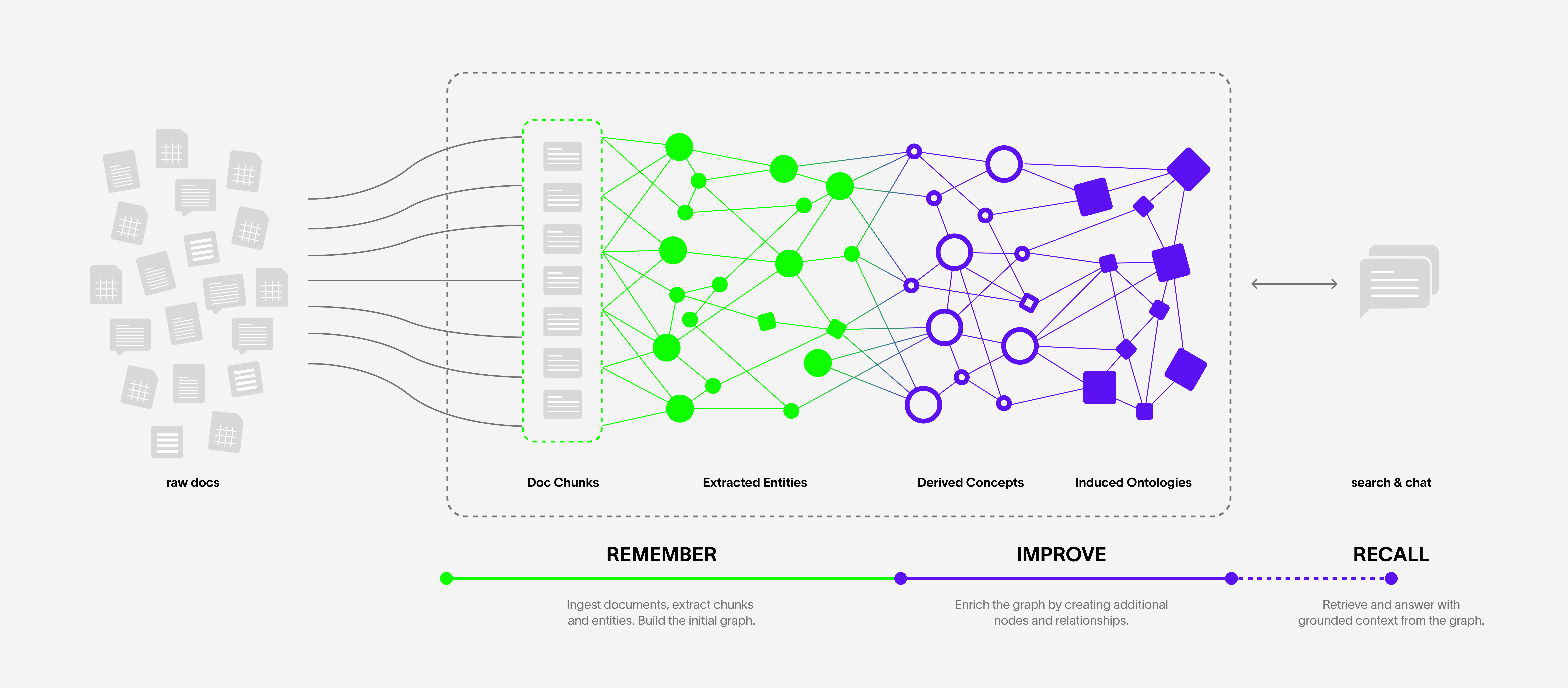
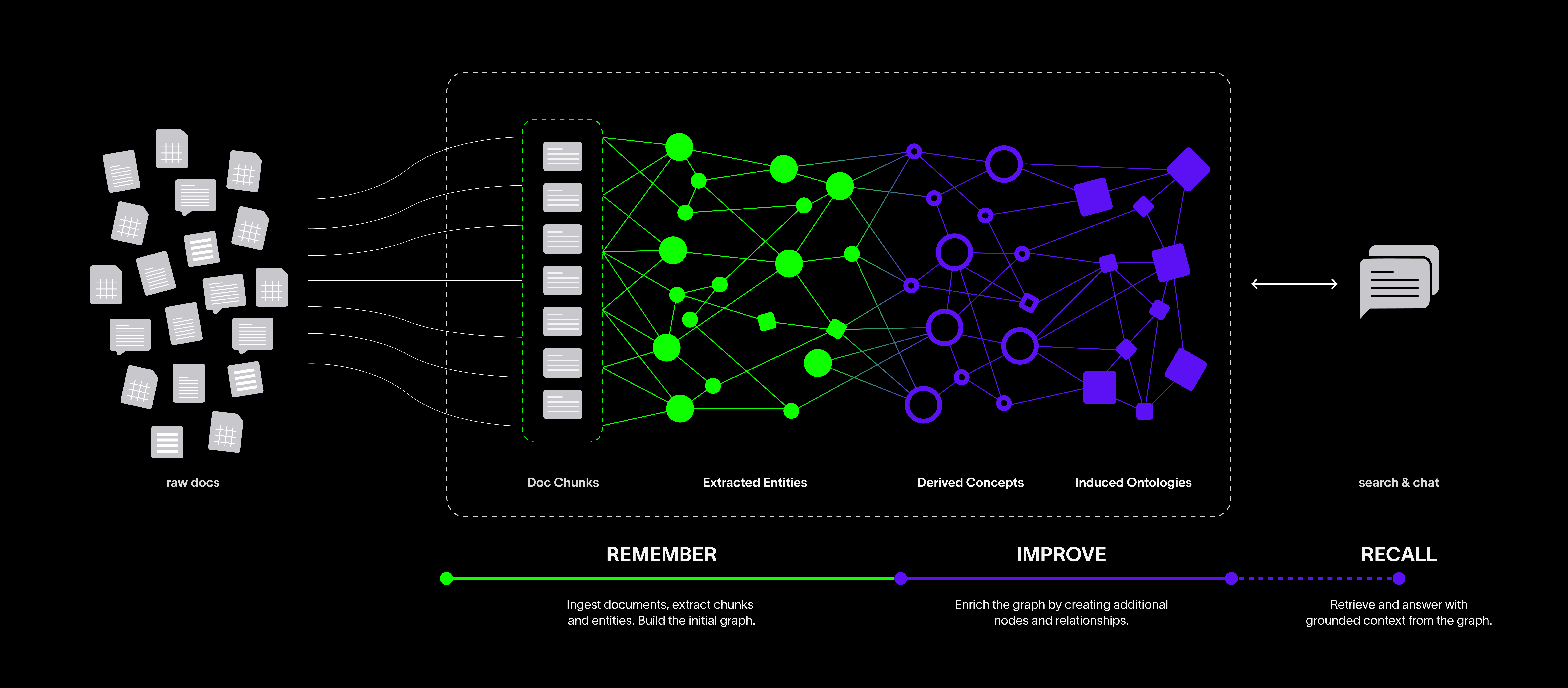 Give Cognee your documents, and it creates a graph of raw information, extracted concepts, and meaningful relationships you can query.
## Why AI memory matters
When you call an LLM, each request is stateless: it doesn't remember what happened in the last call, and it doesn't know about the rest of your documents.
That makes it hard to build applications that actually use your documents and carry context forward. You need a memory layer that can link your documents together and create the right context for every LLM call.
## How Cognee works
Cognee v1.0 exposes four operations that cover the full memory lifecycle:
* **[`.remember`](/core-concepts/main-operations/remember) — Store data in memory:**
Give Cognee text, files, or URLs. It ingests, chunks, extracts entities, and builds the knowledge graph for you in one call. Supports permanent graph memory or fast session memory.
* **[`.recall`](/core-concepts/main-operations/recall) — Query memory:**
Ask a question in natural language. Cognee picks the best retrieval strategy automatically, or you can specify one. Works across the permanent graph and session cache.
* **[`.improve`](/core-concepts/main-operations/improve) — Enrich existing memory:**
Runs enrichment passes on an already-built graph. With session IDs, it bridges short-term session memory into the permanent graph and applies feedback-based weighting.
* **[`.forget`](/core-concepts/main-operations/forget) — Remove memory:**
Delete a specific data item, an entire dataset, or everything owned by the current user.
If you want direct control over each pipeline step, the lower-level [Add](/core-concepts/main-operations/legacy-operations/add), [Cognify](/core-concepts/main-operations/legacy-operations/cognify), [Search](/core-concepts/main-operations/legacy-operations/search), and [Memify](/core-concepts/main-operations/legacy-operations/memify) operations are still available.
## Ready to get started?
**Installation Guide**
Set up your environment and install Cognee to start building AI memory.
**Quickstart Tutorial**
Get started with Cognee by running your first knowledge graph example.
**Core Concepts**
Dive deeper into Cognee's powerful features and capabilities.
Give Cognee your documents, and it creates a graph of raw information, extracted concepts, and meaningful relationships you can query.
## Why AI memory matters
When you call an LLM, each request is stateless: it doesn't remember what happened in the last call, and it doesn't know about the rest of your documents.
That makes it hard to build applications that actually use your documents and carry context forward. You need a memory layer that can link your documents together and create the right context for every LLM call.
## How Cognee works
Cognee v1.0 exposes four operations that cover the full memory lifecycle:
* **[`.remember`](/core-concepts/main-operations/remember) — Store data in memory:**
Give Cognee text, files, or URLs. It ingests, chunks, extracts entities, and builds the knowledge graph for you in one call. Supports permanent graph memory or fast session memory.
* **[`.recall`](/core-concepts/main-operations/recall) — Query memory:**
Ask a question in natural language. Cognee picks the best retrieval strategy automatically, or you can specify one. Works across the permanent graph and session cache.
* **[`.improve`](/core-concepts/main-operations/improve) — Enrich existing memory:**
Runs enrichment passes on an already-built graph. With session IDs, it bridges short-term session memory into the permanent graph and applies feedback-based weighting.
* **[`.forget`](/core-concepts/main-operations/forget) — Remove memory:**
Delete a specific data item, an entire dataset, or everything owned by the current user.
If you want direct control over each pipeline step, the lower-level [Add](/core-concepts/main-operations/legacy-operations/add), [Cognify](/core-concepts/main-operations/legacy-operations/cognify), [Search](/core-concepts/main-operations/legacy-operations/search), and [Memify](/core-concepts/main-operations/legacy-operations/memify) operations are still available.
## Ready to get started?
**Installation Guide**
Set up your environment and install Cognee to start building AI memory.
**Quickstart Tutorial**
Get started with Cognee by running your first knowledge graph example.
**Core Concepts**
Dive deeper into Cognee's powerful features and capabilities.