

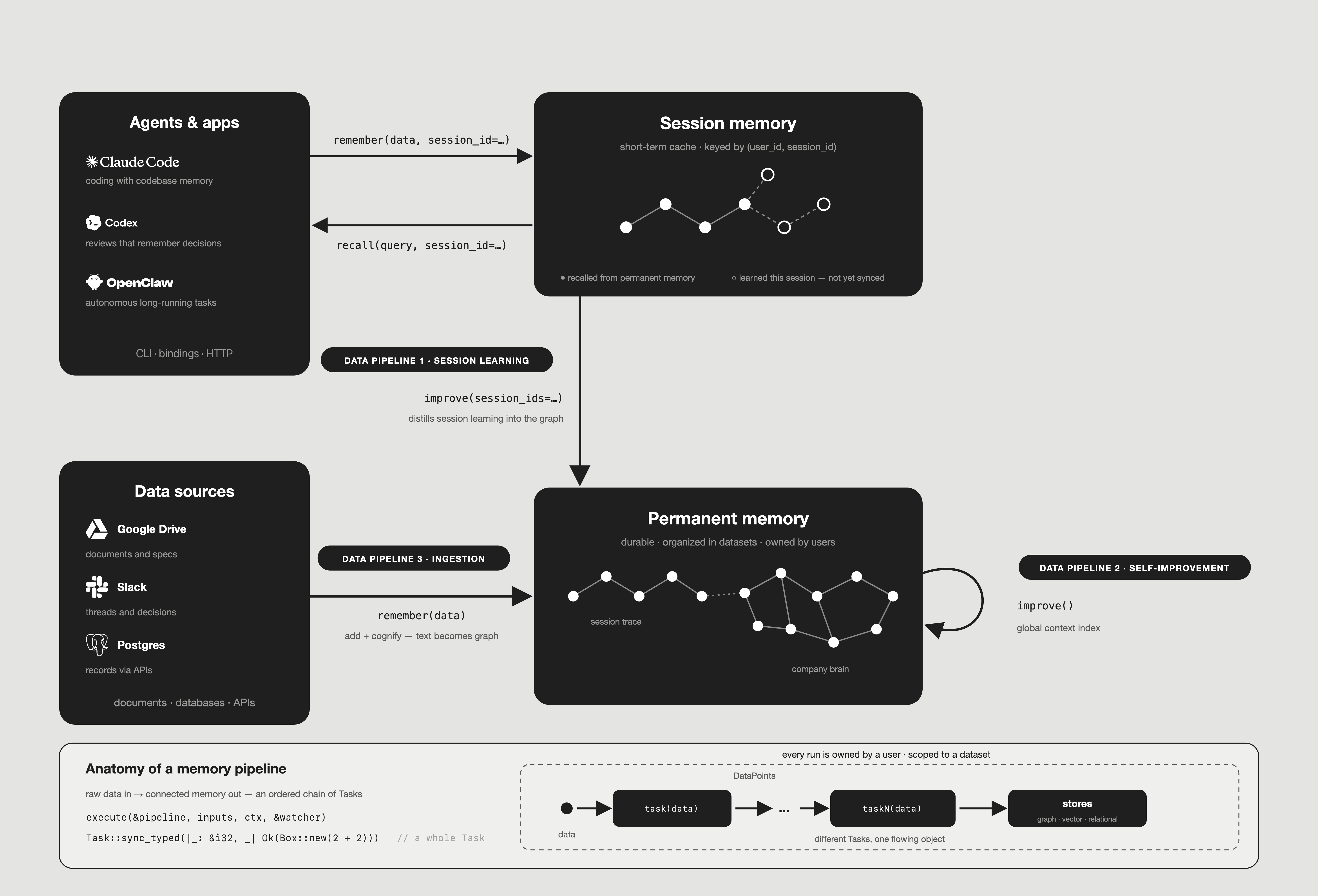
improve runs; conflict review is not ported yet. In Rust, agents reach these operations through the CLI, the language bindings and the HTTP server rather than MCP. The Anatomy section explains the Task and execute calls the diagram shows.
Data Pipeline 1: Session learning
Agents write conversation turns into session memory withremember and a session id (--session-id in the CLI). Text inputs are joined and stored as one Q&A entry in the session store; a file is recorded only as a [file: <path>] marker, not read. Nothing is chunked or extracted, which keeps the write fast, and is also why it does not reach the permanent graph on its own. Searches and recalls that use the session add their own questions and answers, agent trace steps are recorded there, and while AUTO_FEEDBACK is on each turn is analyzed for feedback and guidance.
The session-learning pipeline bridges this into the graph. improve with session ids:
- applies feedback weights, so graph nodes and edges that helped produce well-rated answers rank higher in later graph searches whose
feedback_influenceis above 0, set per search or withDEFAULT_FEEDBACK_INFLUENCE, which defaults to 0 (feedback_weights) - cognifies the session’s Q&A, and the feedback from its agent trace steps, into the graph (
persist_session_qa,persist_agent_traces) - distills lessons from the session’s Q&A and the agent’s trace steps (
distill_sessions,extract_agent_context). Both need an LLM, and the trace-step lessons also needAUTO_FEEDBACKon - with personalization on, folds the user’s ratings and stated preferences into a per-user, per-dataset preference node that later searches rank by (
update_user_preferences) - builds the truth subspace when you opt in with
build_truth_subspace, on graph backends that support it - also refreshes the global context index, as in Pipeline 2
remember, the improve for that session is launched as a detached background task, and remember returns as soon as the entry is stored. It is skipped when self-improvement is off (--no-improve in the CLI, the bindings’ selfImprovement: false, or self_improvement = false in Rust), when IMPROVE_AUTO_ENABLED=false, when the improve settings are invalid, or when a host’s admission check declines it. It is also debounced by improve.debounce_entries / improve.debounce_seconds; the defaults (1 entry, 0 seconds) run it after every call. Without it, session content stays in the session until you run improve yourself. A short-lived host waits for the background work with cognee::wait_for_background_tasks (the CLI does this before it exits).
Data Pipeline 2: Self-improvement
Once data is in the permanent graph, the self-improvement pipeline enriches it in place. Runningimprove on a dataset without session ids runs the one stage that works on the graph alone. The session-fed stages, the truth subspace included, are skipped with no_session_ids:
- Global context index (on by default): one summary bucket per document, naming the entities it is distinctively about, plus a root summary for the dataset. Graph and hybrid completion searches prepend it to their context when the search sets
include_global_context_index, which is off by default. It makes no LLM call, and a re-run is skipped when nothing was written to the dataset since the last one.
remember runs this improve automatically before it returns, under the same on/off switches and admission check as Pipeline 1. It is not detached and not debounced.
Data Pipeline 3: Ingestion
remember without a session id writes straight to permanent memory. Under the hood it runs add, then cognify:
- add reads text, files and URLs through the loaders, deduplicates by content hash within the dataset, and stores the data rows and files.
- cognify classifies the documents, chunks them, extracts entities and relationships (with the LLM; with no usable LLM, the
autoextractor needs a host-registeredglinerextractor, since none ships with cognee-rs, and cognify otherwise fails with a setup error) while summarizing the chunks, and writes the results: graph nodes and edges to the graph store, embeddings to the vector store, and provenance to the relational store.
How the two memories meet at read time
Retrieval ties the flows together.recall picks its sources with scope. With a session id and no query type, the default auto scope checks the session first. With no dataset filter, a session hit answers on its own and a miss falls through to the permanent graph; with a dataset filter, both contribute. Without a session id, or with a query type, recall reads only the graph. Every result carries the source it came from.
The flows also feed each other at read time. A completion search can carry the session’s active guidance (the lessons Pipeline 1 stored), the user’s preferences, and, when the search sets include_global_context_index, the global context index from Pipeline 2.
Anatomy of a memory pipeline
All three flows share one structure: a Pipeline is an ordered sequence of Tasks, where each Task transforms data and passes DataPoints on until the results land in the stores. A Task returns one value (sync or async), a sync iterator or an async stream, and works on one item or a whole batch: eight flavours in all. That is how a step can fan out (one document into many chunks), stream, or process a batch at once. Every task receives aTaskContext with the stores, cancellation and progress tokens, and the run’s PipelineContext. execute(&pipeline, inputs, ctx, &watcher) runs a pipeline over its inputs and sends the run’s lifecycle events to the watcher. The primitives live in cognee-core.
Every run is owned: it runs on behalf of a user, against a dataset, and stamps that user on the DataPoints it writes. Within one process, writers to one dataset are serialized: cognify, dataset-scoped deletes and improve take the same per-dataset lock by default, so they queue instead of racing; add takes it only while it looks up, creates and attaches each item’s dataset. Each data item’s completion is recorded, so a re-run skips the items already done.
Related
Pipelines
How tasks are chained into runs
Improve
The operation behind session learning and self-improvement
Sessions
How short-term session memory works